Real Time Delivery Truck Detector
Like many urban neighborhoods, ours has experienced an increase in mail and package theft over the last few years. That means it’s important to collect mail/package soon after they are delivered. Our neighborhood uses clustered community mailboxes managed by USPS. Since these mailboxes belong to USPS, residents aren’t allowed to modify them.
If this had been my own mailbox, the solution would have been trivial. A simple reed switch on the mailbox door could detect when the door opened and immediately send a notification.
Instead, our neighborhood relied on a community WhatsApp group. Whenever someone happened to see the USPS truck driving through, they would send a message so everyone else could check their mailboxes. Well, it worked….when someone actually noticed the truck. Most days nobody did 🤷!
Overview
In this project, I have built a delivery detection system that monitors a driveway using a camera feed and identifies delivery vehicles such as USPS, UPS, FedEx, Amazon trucks. I have designed this to run on edge devices(my favorite lightweight hardware Raspberry Pi).
Since every mail truck has to drive down the same road before reaching our mailbox cluster, I wondered if I could simply detect the truck as it passed.
TABLE OF CONTENTS:
- Take 1: Raspberry Pi and a Webcam
- Take 2: Investing in an Outdoor Camera and Training My Own Model
- Architecture
- Lessons Learned
- Results
Take 1: Raspberry Pi and a Webcam
Before investing in an outdoor camera, I started with whatever hardware I already owned (and opensource software):
- Raspberry Pi 4
- Logitech USB webcam
- Ultralytics YOLOv8n (of the shelf model)
Within an evening, I had a prototype detecting vehicles in real time.
- Cars? ✅
- Buses? ✅
- Tucks? ✅
Problem solved?! 🎉🕺 … .. Not even close 😮
The model labeled every large delivery vehicle as simply truck 😞.
Unfortunately, truck includes:
- USPS
- UPS
- FedEx
- Amazon
- Garbage trucks
- Moving trucks
- Construction trucks
The detector model was technically correct. It just wasn’t useful.
I didn’t care that a truck drove by. I cared that a USPS, FedEx, Amazon truck drove by.
That realization exposed the first major limitation of off-the-shelf object detection models.
YOLO is trained to recognize common object categories. It isn’t trained to distinguish every company’s delivery vehicle.
Take 2: Investing in an outdoor camera and training my own model
The USB webcam was only intended as a proof of concept. For a permanent installation I needed an outdoor camera.
After comparing several options, it was time to buy some electronic device 🤩 I chose the TP-Link Tapo C320WS because it supports RTSP streaming.
That meant the Raspberry Pi could process video directly over the network without relying on cloud APIs. I mounted 🪜 the camera roughly 15 feet above the ground on the exterior of my house. Then I copied over the exact same YOLO model and detection script.
All set, now I should be in business..😎.
Instead…everything broke 😢…Vehicles were completely missed.
Meanwhile random manhole covers, shadows and patches of pavement occasionally became cars 🤯
It made no sense.🤨
The exact same model that worked perfectly with the webcam had become almost unusable.
⚠️ Problem: The Camera Angle Problem
After a lot of debugging I learned an important lesson about computer vision. YOLO wasn’t trained on images from my camera. Most training datasets consist of photographs captured from ground level.
My camera looked down from nearly fifteen feet above the street. The viewing angle completely changed how vehicles appeared.
The model wasn’t failing because it was bad. It was failing because I was asking it to recognize viewpoints it had rarely seen during training.
That meant there was only one real solution.
Train my own model 👨💻
Building Dataset
The first task wasn’t training. It was data collection. Since I already had the camera installed. I wrote a script that continuously monitored the RTSP stream and captured images whenever motion occurred.
Rather than immediately running inference, I split the system into two independent pipelines.
Pipeline 1:
Camera 📹
↓
Motion Detection 👁️🗨️
↓
Save Full Resolution Images 💾
Pipeline 2:
   Saved Images 💾
        ↓
  YOLO Inference 🧠
        ↓
   Notifications 🔔
Initially I had attempted to perform capture and inference in the same script as part of the same pipeline. That quickly became unreliable especially whenever inference slowed down, frames were dropped. Separating capture from inference turned out to be far more reliable.
The camera continuously archived images while inference processed them independently. No frames were lost.
Hundreds of Labels
Collecting images turned out to be the easy part. Labeling them was another story.
Over the next several weeks, I labeled hundreds of images using Label Studio.
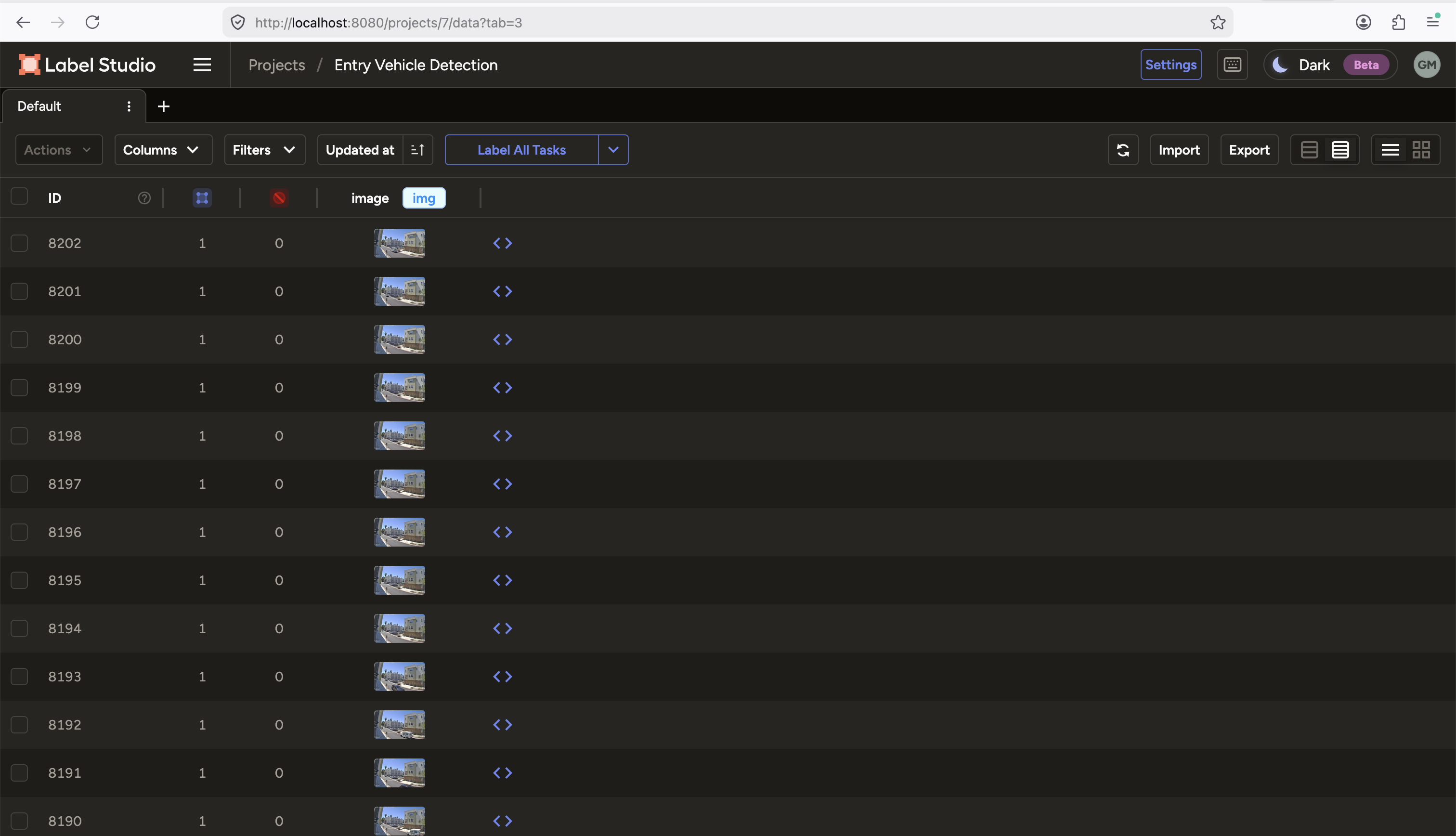
Every vehicle became one of several classes.
car
truck
USPS truck
UPS truck
FedEx truck
Amazon truck
garbage truck
person
pet
One thing became obvious almost immediately. The dataset was extremely imbalanced. There were hundreds of cars, people but only a handful of delivery trucks. Machine learning models love balanced datasets.
Whenever the camera spotted a delivery truck, I made sure that it captured every possible angle - Morning, Afternoon, Cloudy, Sunny, Different distances, Different lanes.
Every additional delivery truck (especially USPS) image mattered.
Training the Model
Now that I had the labeled images, next step was training a model on these images (which were captured from my camera). I did the training using Kaggle GPUs.
I experimented with several base YOLO variants before settling on a model that balanced accuracy with Raspberry Pi inference speed.The results were encouraging.
The model could finally distinguish:
- USPS
- UPS
- FedEx
- Amazon
- Garbage trucks
instead of calling everything simply truck.
The project had crossed an important milestone 🚩. It was finally solving the original problem 😊
⚠️ Problem: The Raspberry Pi Was Still Too Slow for RTSP
Running inference on every frame in real time wasn’t practical. The Raspberry Pi simply couldn’t keep up with a continuous RTSP stream.
For this I optimized the input. This produced the biggest performance improvement of the entire project.
Instead of analyzing the full image, I cropped the roadway where vehicles actually appeared.
Original Camera Frame

+--------------------------------------+
|                                      |
|             Houses                   |
|                                      |
| -------------------------------      |
|       ROAD  ← __Crop ME__            |
|                                      |
+--------------------------------------+
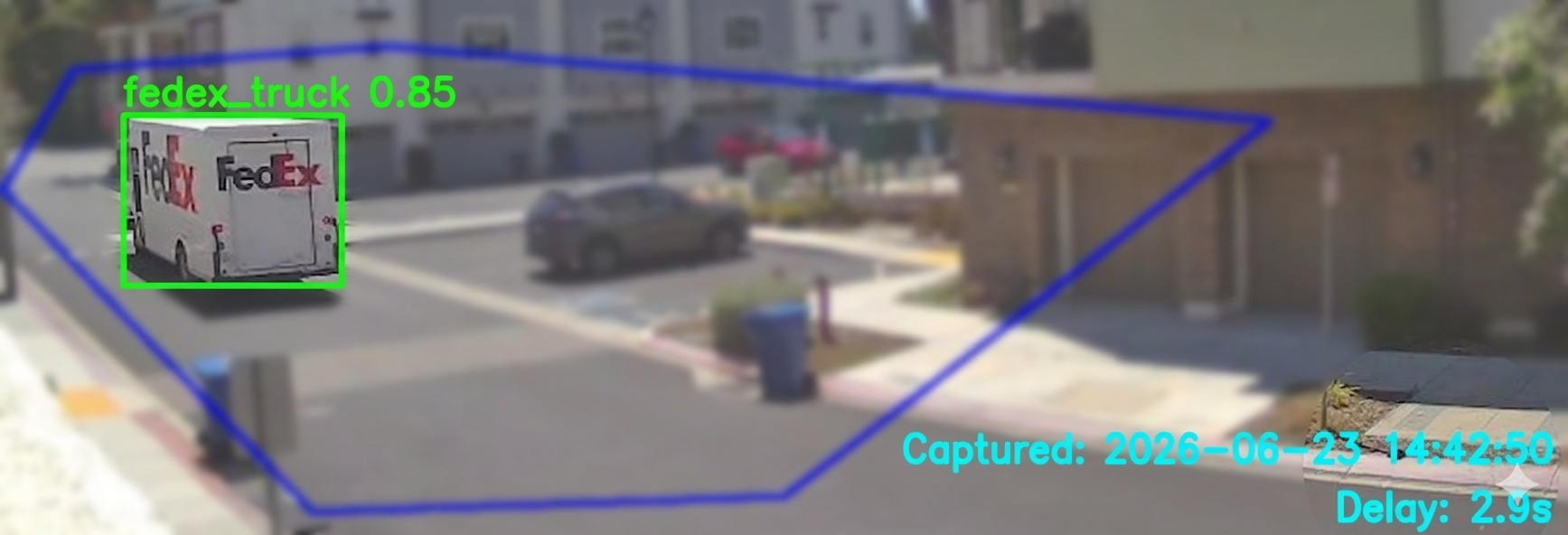
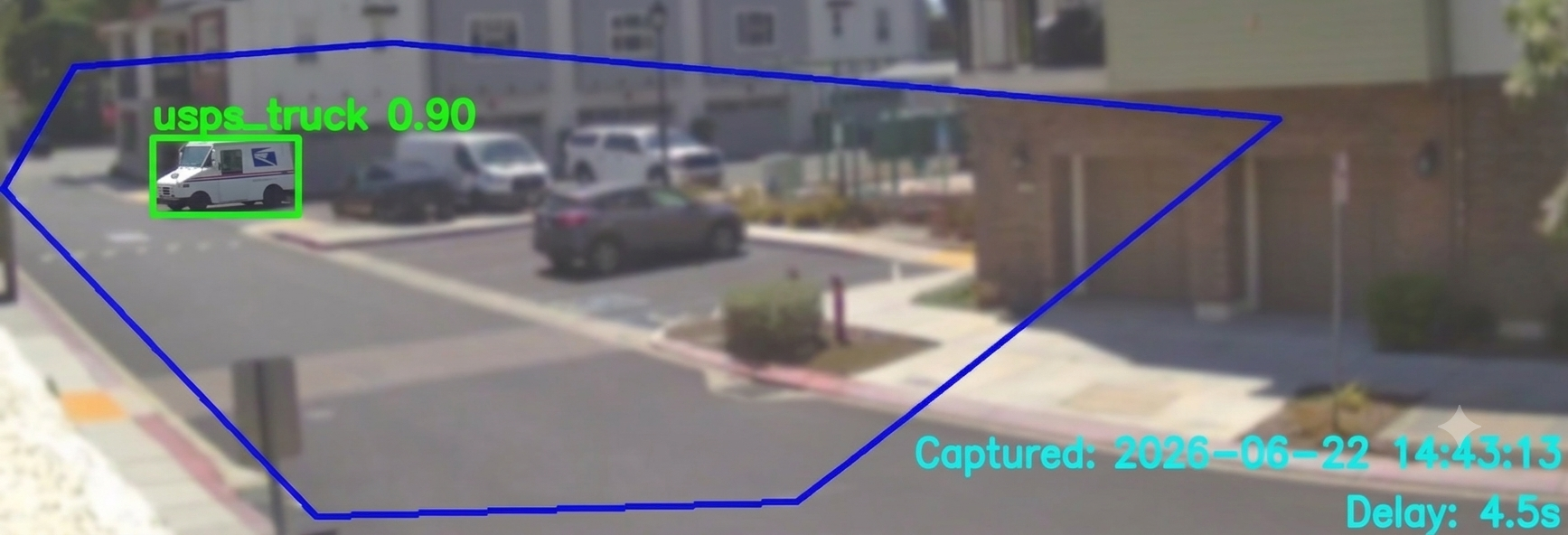
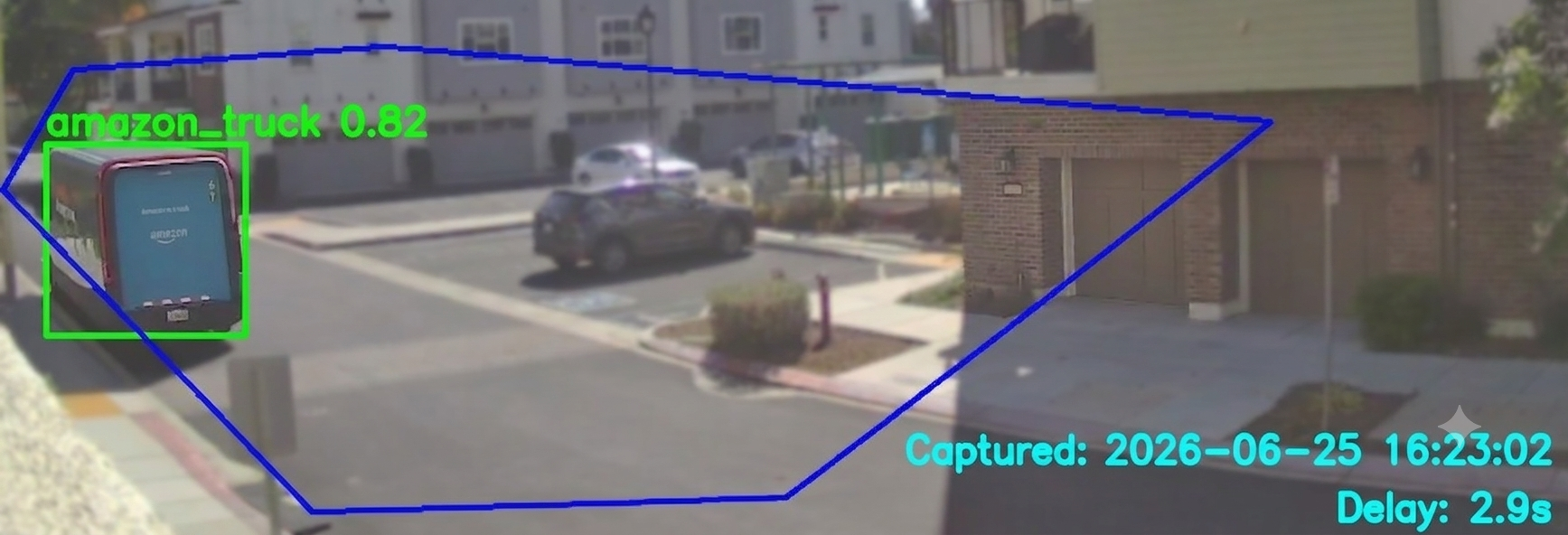
After cropping, I resized the image to the model’s preferred resolution. Then I applied a polygon mask. Only the roadway remained visible. Everything else was blacked out. That reduced false positives while decreasing computation.
Instead of asking the model to search the entire frame, it now only searched the few hundred pixels where vehicles could actually exist.
This dramatically improved both speed and accuracy.
Notifications
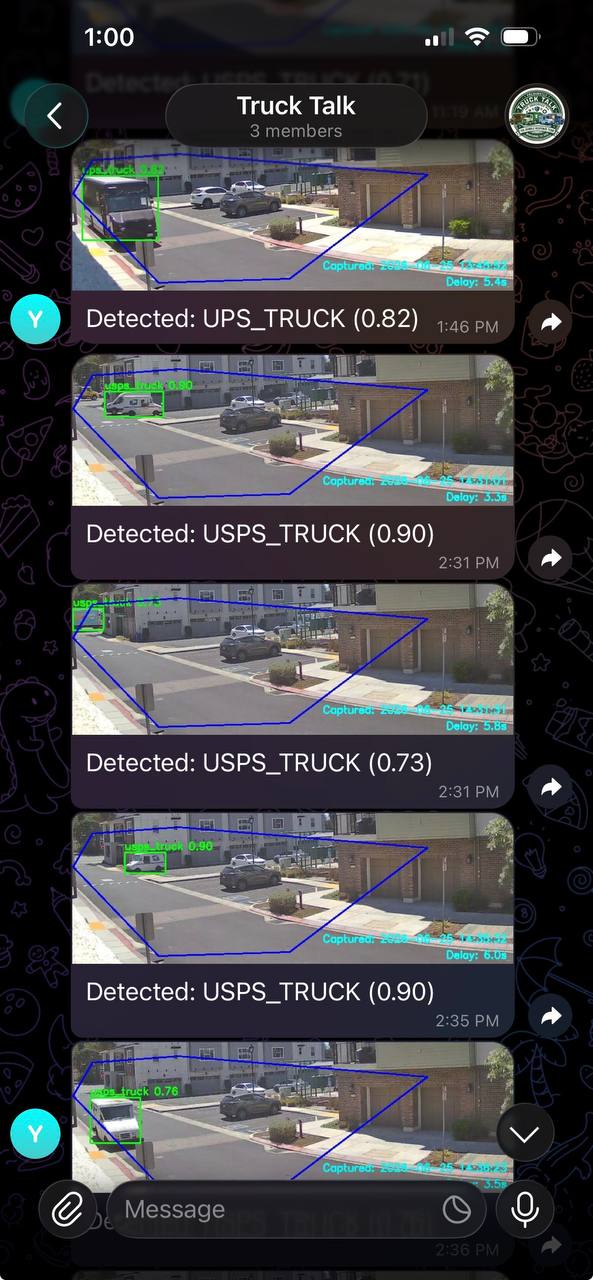
I configured an event-driven Telegram bot that sends real-time alerts upon delivery truck detection, providing the vehicle type, confidence score, and system inference latency.
Architecture
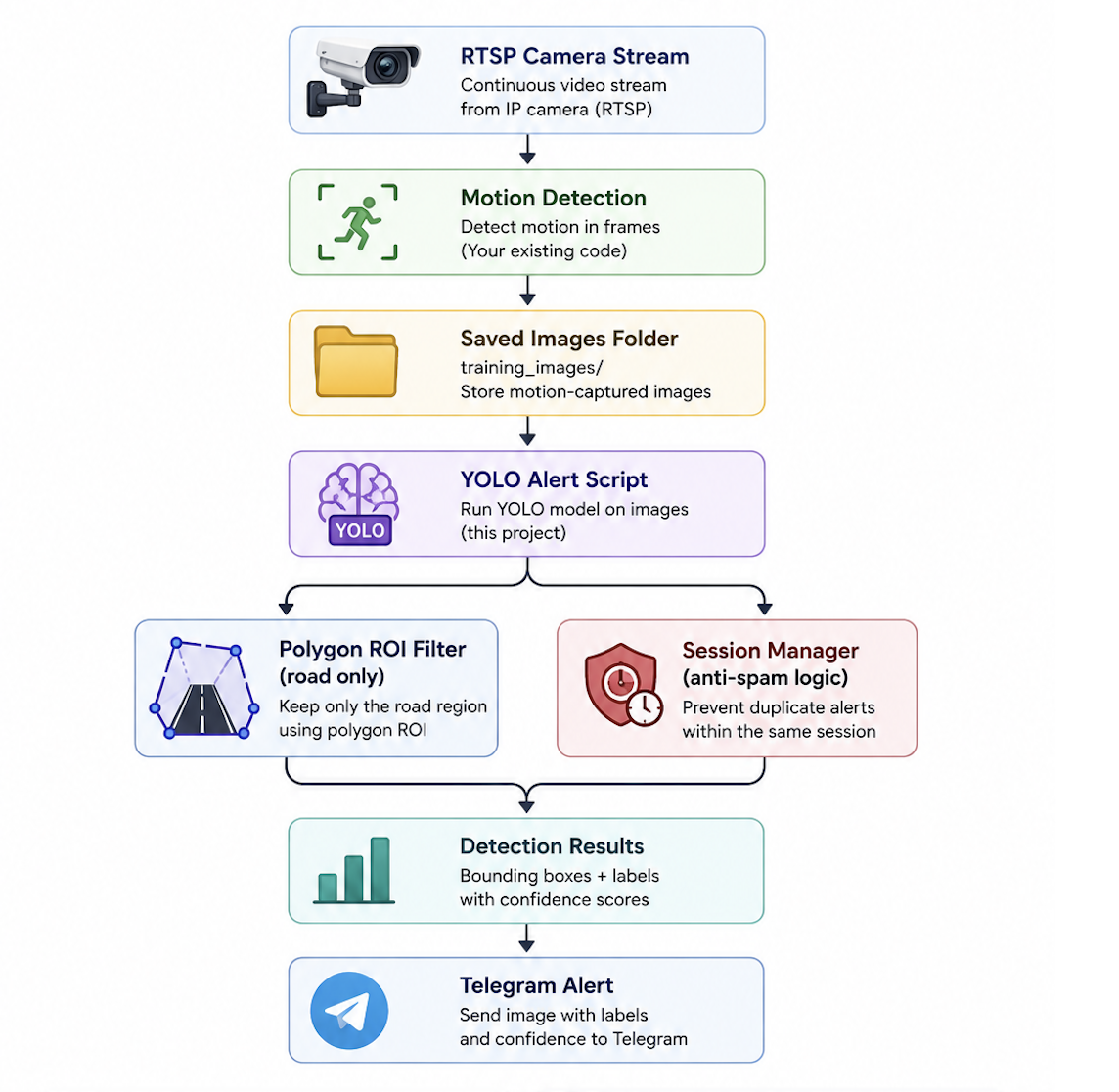
Today, the system looks something like this.
Lessons Learned
- Good data matters more than fancy models: Collecting and labeling thousands of images took far longer than training.
- Camera placement matters: A model trained on street-level photographs may perform poorly when mounted fifteen feet above the ground.
- Optimize the pipeline before optimizing the model: Cropping the image and masking unnecessary regions improved performance more than switching to a larger neural network.
- Separate responsibilities: Splitting image capture from inference made the system dramatically more reliable.
Results
The system now reliably distinguishes USPS, UPS, FedEx, Amazon, garbage trucks, and regular traffic using a custom-trained YOLO model running on a Raspberry Pi.
More importantly, it solves the original problem.
Instead of relying on someone in the neighborhood to notice the USPS truck and post in WhatsApp, the system automatically recognizes the delivery truck as it drives by.